
[Spring] redirect를 하는 이유
request에 대한 response로 redirect, foward를 주로 사용한다.
그 이유는 무엇일까?
일단 redirect를 하는 이유를 말하기 전에 foward와의 차이를 알아보자.
1. redirect / foward 차이
1-1. redirect를 사용하는 경우
- 새로운 요청으로 전환해야 할 때
- URL 주소 변경이 필요할 때
- 회원가입, 글쓰기 등의 시스템에 변화가 생길 때
1-2. foward를 사용하는 경우
- 객체를 재사용 해야할 경우
- 시스템에 변화가 생기지 않는 단순 조회 등의 경우
2. 왜 redirect를 사용할까?
사이트에 회원가입이나, 결제, 게시판에 글을 쓸 경우 완료 페이지, 글목록으로 가는 경우가 이에 해당한다.
리다이렉트는 주로 안전 / 안정성을 위해 사용한다고 생각하는데, 요청이 정상적으로 이루어졌음에도 다시 요청하는 것을 방지한다.
만약 글쓰기나 회원가입 단계에서 실패할 경우 귀찮게 재입력하지 않도록 포워드를 사용할 수도 있는데 결제 실패 시에 포워드가 아닌 리다이렉트를 사용하는 이유는 무엇일까?
포워드는 동일한 요청을 내부에서 다시 처리하기 때문에, 클라이언트가 새로고침을 사용할 경우 에러 위험이 있으며, 내부에서 request 객체를 그대로 넘기므로 이전에 보낸 파라미터가 노출될 수 있기 때문이다.
또한, 실패 원인을 정확하게 클라이언트에게 보여줄 수 있다.
다만 단순 글쓰기의 경우, 민감한 정보가 아니기에 포워드를 사용할 수도 있다.
실습을 통해 조금 더 친해져 보자.
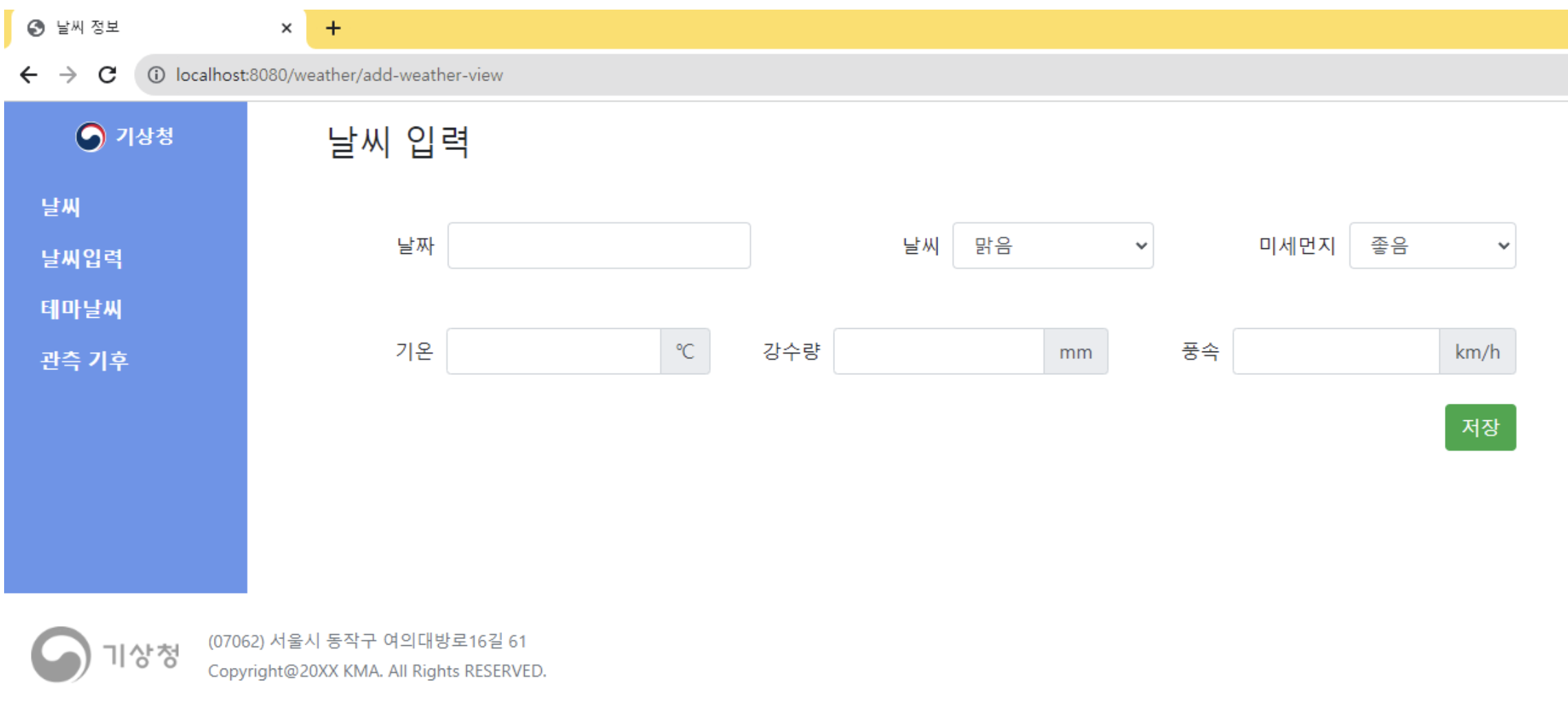
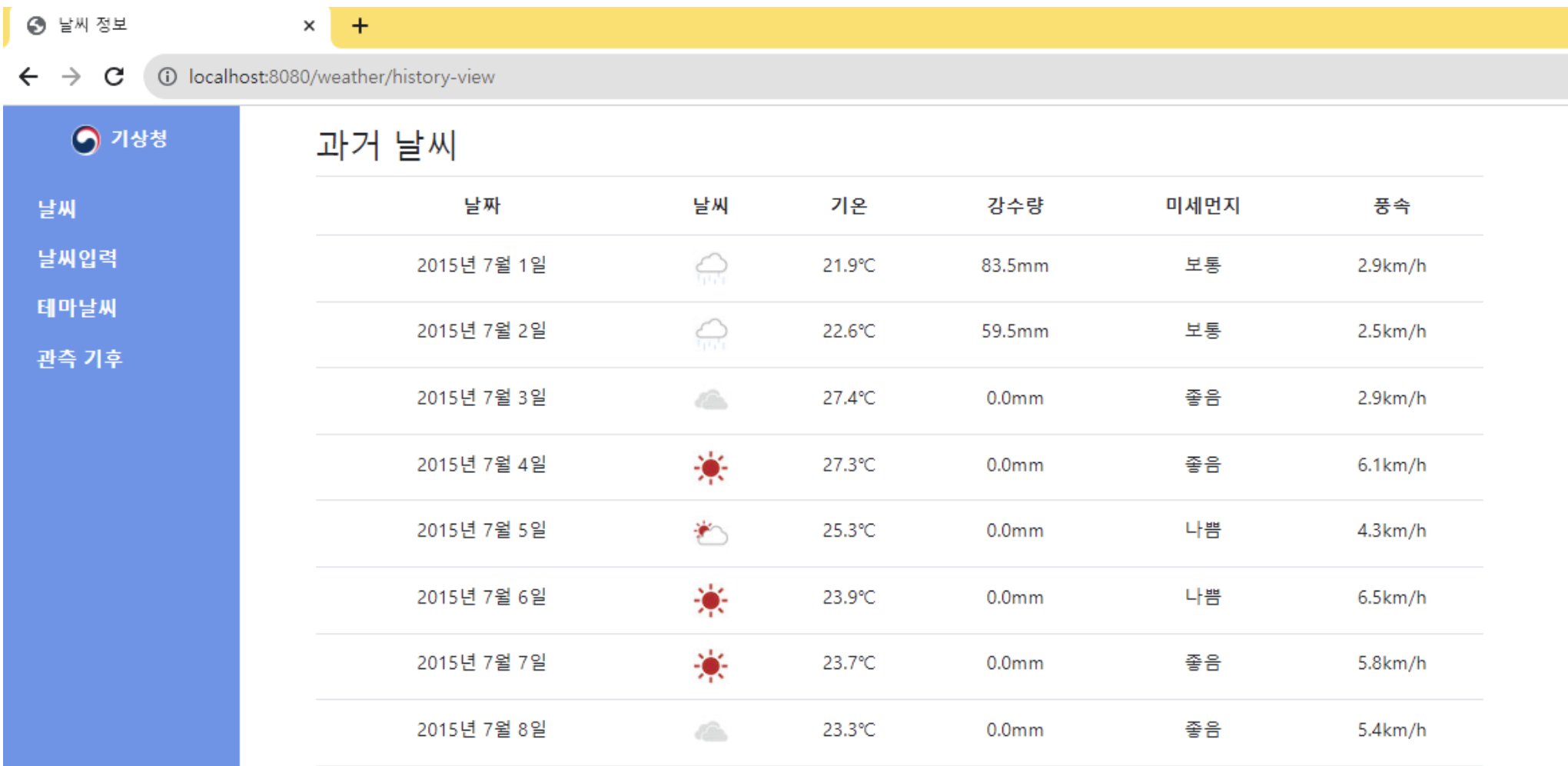
3. Model / Controller
3-1. Controller
@RequestMapping("/weather-history")
@Controller
public class WeatherHistoryController {

  @Autowired
  private weatherHistoryBO weatherHistoryBO;

  @GetMapping("/add-view")
  public String addView() {
    return "lesson05/addWeather";
  }

  @PostMapping("/add")
  public String addWeather(
      // @DateTimeFormat(pattern="yyyy-MM-dd") 'date' type 사용 시 convert해줘야 insert 가능
      // LocalDate 대신 String으로 받아도 자동변환되어 DB에 저장됨
      // DTO로 받을 경우 DTO class에 annotation!
      @RequestParam("date") LocalDate date,
      @RequestParam("weather") String weather,
      @RequestParam("microDust") String microDust,
      @RequestParam("temperatures") double temperatures,
      @RequestParam("precipitation") double precipitation,
      @RequestParam("windSpeed") double windSpeed,
      Model model) {

    weatherHistoryBO.setWeather(date, weather, microDust, temperatures, precipitation, windSpeed);
    model.addAttribute("weather", weather);

    // redirect 방법 두 가지
    // parameter -> HttpServletResponse response
    // method -> response.sendRedirect("절대경로")

    return "redirect:/weather-history/list";
  }

  @GetMapping("/list")
  public String weatherList(Model model) {

    List<Weather> weatherHistoryList = weatherHistoryBO.getWeatherHistoryList();

    model.addAttribute("weatherHistoryList", weatherHistoryList);

    return "lesson05/weatherList";
  }
}
3-2. BO
@Service
public class weatherHistoryBO {

  @Autowired
  private weatherHistoryMapper weatherHistoryMapper;

  public void setWeather(
      LocalDate date, String weather, String microDust, double temperatures, double precipitation, double windSpeed) {
    weatherHistoryMapper.addWeather(date, weather, microDust, temperatures, precipitation, windSpeed);
  }

  public List<Weather> getWeatherHistoryList() {
    return weatherHistoryMapper.selectWeatherHistoryList();
  }
}
3-3. Mapper
@Mapper
public interface weatherHistoryMapper {

  public void addWeather(
      @Param("date") LocalDate date,
      @Param("weather") String weather,
      @Param("microDust") String microDust,
      @Param("temperatures") double temperatures,
      @Param("precipitation") double precipitation,
      @Param("windSpeed") double windSpeed);

  public List<Weather> selectWeatherHistoryList();
}
3-4. Mapper.xml
<?xml version="1.0" encoding="UTF-8"?>
<!DOCTYPE mapper PUBLIC "-//mybatis.org//DTD Mapper 3.0//EN"
"http://mybatis.org/dtd/mybatis-3-mapper.dtd">
<mapper namespace="com.quiz.lesson05.weatherhistory.weatherHistoryMapper">
  <insert id="addWeather" parameterType="com.quiz.lesson05.weatherhistory.Weather">
    INSERT INTO `weather_history`
    (
      `date`
      ,`weather`
      ,`temperatures`
      ,`precipitation`
      ,`microDust`
      ,`windSpeed`
      ,`createdAt`
      ,`updatedAt`
    )
    VALUES
    (
      #{date}
      ,#{weather}
      ,#{temperatures}
      ,#{precipitation}
      ,#{microDust}
      ,#{windSpeed}
      ,NOW()
      ,NOW()
    )
  </insert>

  <select id="selectWeatherHistoryList" resultType="com.quiz.lesson05.weatherhistory.Weather">
    SELECT
      `id`
      ,`date`
      ,`weather`
      ,`temperatures`
      ,`precipitation`
      ,`microDust`
      ,`windSpeed`
      ,`createdAt`
      ,`updatedAt`
    FROM
      `weather_history`
  </select>

</mapper>
3-5. DTO
public class Weather {

  private int id;
  private LocalDate date;
  private String weather;
  private double temperatures;
  private double precipitation;
  private String microDust;
  private	double windSpeed;
  private LocalDateTime createdAT;
  private LocalDateTime updatedAT;

  public int getId() {
    return id;
  }
  public void setId(int id) {
    this.id = id;
  }
  public LocalDate getDate() {
    return date;
  }
  public void setDate(LocalDate date) {
    this.date = date;
  }
  public String getWeather() {
    return weather;
  }
  public void setWeather(String weather) {
    this.weather = weather;
  }
  public double getTemperatures() {
    return temperatures;
  }
  public void setTemperatures(double temperatures) {
    this.temperatures = temperatures;
  }
  public double getPrecipitation() {
    return precipitation;
  }
  public void setPrecipitation(double precipitation) {
    this.precipitation = precipitation;
  }
  public String getMicroDust() {
    return microDust;
  }
  public void setMicroDust(String microDust) {
    this.microDust = microDust;
  }
  public Double getWindSpeed() {
    return windSpeed;
  }
  public void setWindSpeed(Double windSpeed) {
    this.windSpeed = windSpeed;
  }
  public LocalDateTime getCreatedAT() {
    return createdAT;
  }
  public void setCreatedAT(LocalDateTime createdAT) {
    this.createdAT = createdAT;
  }
  public LocalDateTime getUpdatedAT() {
    return updatedAT;
  }
  public void setUpdatedAT(LocalDateTime updatedAT) {
    this.updatedAT = updatedAT;
  }
}
4. View
4-1. Insert
<!DOCTYPE html>
<html xmlns:th="http://www.thymeleaf.org" lang="ko">
<head>
    <meta charset="utf-8">
    <title></title>
    <!-- bootstrap -->
    <link rel="stylesheet" href="https://cdn.jsdelivr.net/npm/bootstrap@4.6.2/dist/css/bootstrap.min.css" integrity="sha384-xOolHFLEh07PJGoPkLv1IbcEPTNtaed2xpHsD9ESMhqIYd0nLMwNLD69Npy4HI+N" crossorigin="anonymous">
    <script src="https://code.jquery.com/jquery-3.7.1.js" integrity="sha256-eKhayi8LEQwp4NKxN+CfCh+3qOVUtJn3QNZ0TciWLP4=" crossorigin="anonymous"></script>
    <script src="https://cdn.jsdelivr.net/npm/bootstrap@4.6.2/dist/js/bootstrap.bundle.min.js" integrity="sha384-Fy6S3B9q64WdZWQUiU+q4/2Lc9npb8tCaSX9FK7E8HnRr0Jz8D6OP9dO5Vg3Q9ct" crossorigin="anonymous"></script>
    <!-- datepicker -->
  <link rel="stylesheet" href="http://code.jquery.com/ui/1.12.1/themes/base/jquery-ui.css">
  <script src="https://code.jquery.com/ui/1.12.1/jquery-ui.js"></script>

<link rel="stylesheet" type="text/css" th:href="@{/css/weatherHistoryStyle.css}">

<!-- 구글링한 datepicker 그대로 적용 -->
<script>
  $(function() {
      //input을 datepicker로 선언
      $("#date").datepicker({
          dateFormat: 'yy-mm-dd' //달력 날짜 형태
          ,showOtherMonths: true //빈 공간에 현재월의 앞뒤월의 날짜를 표시
          ,showMonthAfterYear:true // 월- 년 순서가아닌 년도 - 월 순서
          ,changeYear: true //option값 년 선택 가능
          ,changeMonth: true //option값  월 선택 가능
          ,showOn: "both" //button:버튼을 표시하고,버튼을 눌러야만 달력 표시 ^ both:버튼을 표시하고,버튼을 누르거나 input을 클릭하면 달력 표시
          ,buttonImage: "http://jqueryui.com/resources/demos/datepicker/images/calendar.gif" //버튼 이미지 경로
          ,buttonImageOnly: true //버튼 이미지만 깔끔하게 보이게함
          ,buttonText: "선택" //버튼 호버 텍스트
          ,yearSuffix: "년" //달력의 년도 부분 뒤 텍스트
          ,monthNamesShort: ['1월','2월','3월','4월','5월','6월','7월','8월','9월','10월','11월','12월'] //달력의 월 부분 텍스트
          ,monthNames: ['1월','2월','3월','4월','5월','6월','7월','8월','9월','10월','11월','12월'] //달력의 월 부분 Tooltip
          ,dayNamesMin: ['일','월','화','수','목','금','토'] //달력의 요일 텍스트
          ,dayNames: ['일요일','월요일','화요일','수요일','목요일','금요일','토요일'] //달력의 요일 Tooltip
          /*  ,minDate: "-5Y" //최소 선택일자(-1D:하루전, -1M:한달전, -1Y:일년전)
          ,maxDate: "+5y" //최대 선택일자(+1D:하루후, -1M:한달후, -1Y:일년후)   */
      });

      //초기값을 오늘 날짜로 설정해줘야 합니다.
      $('#date').datepicker('setDate', 'today'); //(-1D:하루전, -1M:한달전, -1Y:일년전), (+1D:하루후, -1M:한달후, -1Y:일년후)
  });
</script>
</head>
<body>
<div id="wrap">
  <div class="contents d-flex">
    <nav class="col-2">
      <div class="logo d-flex justify-content-center mt-3">
        <img src="https://upload.wikimedia.org/wikipedia/commons/thumb/3/3f/Emblem_of_the_Government_of_the_Republic_of_Korea.svg/800px-Emblem_of_the_Government_of_the_Republic_of_Korea.svg.png" width="25">
        <span class="text-white font-weight-bold ml-2">기상청</span>
      </div>

      <!-- flex-column: 세로 메뉴 -->
      <ul class="nav flex-column mt-4">
        <li class="nav-item">
          <a href="/weather-history/list" class="nav-link menu-font">날씨</a>
        </li>
        <li class="nav-item">
          <a href="/weather-history/add" class="nav-link menu-font">날씨입력</a>
        </li>
        <li class="nav-item">
          <a href="#" class="nav-link menu-font">테마날씨</a>
        </li>
        <li class="nav-item">
          <a href="#" class="nav-link menu-font">관측 기후</a>
        </li>
      </ul>
    </nav>

    <section class="col-10 mt-3 ml-5">
      <h3>날씨 추가</h3>

      <form method="post" action="/weather-history/add">
        <div class="d-flex justify-content-between mt-5">
          <div class="d-flex align-items-center">
            <div class="input-label">날짜</div>
            <input type="text" class="form-control" id="date" name="date">
          </div>
          <div class="d-flex align-items-center">
            <div class="input-label">날씨</div>
            <select class="form-control" name="weather">
              <option>맑음</option>
              <option>구름조금</option>
              <option>흐림</option>
              <option>비</option>
            </select>
          </div>

          <div class="d-flex align-items-center">
            <div class="input-label">미세먼지</div>
            <select class="form-control" name="microDust">
              <option>좋음</option>
              <option>보통</option>
              <option>나쁨</option>
              <option>최악</option>
            </select>
          </div>
        </div>

        <div class="d-flex justify-content-between mt-5">
          <div class="d-flex align-items-center">
            <div class="input-label">기온</div>
            <div class="input-group">
              <input type="text" class="form-control" name="temperatures">
              <div class="input-group-append">
                <span class="input-group-text">℃</span>
              </div>
            </div>
          </div>
          <div class="d-flex align-items-center">
            <div class="input-label">강수량</div>
            <div class="input-group">
              <input type="text" class="form-control" name="precipitation">
              <div class="input-group-append">
                <span class="input-group-text">mm</span>
              </div>
            </div>
          </div>

          <div class="d-flex align-items-center">
            <div class="input-label">풍속</div>
            <div class="input-group">
              <input type="text" class="form-control" name="windSpeed">
              <div class="input-group-append">
                <span class="input-group-text">km/h</span>
              </div>
            </div>
          </div>
        </div>

        <div class="text-right mt-4 mb-5">
          <input type="submit" class="btn btn-success" value="저장">
        </div>
      </form>
    </section>
  </div>
  <footer class="d-flex align-items-center">
    <div>
      <img class="foot-logo-image" src="https://www.weather.go.kr/w/resources/image/foot_logo.png" width="120">
    </div>
    <div>
      <small class="text-secondary">
        (07062) 서울시 동작구 여의대방로16길 61 <br>
        Copyright@2025 KMA. All Rights RESERVED.
      </small>
    </div>
  </footer>
</div>
</body>
</html>
4-2. List (redirect)
<!DOCTYPE html>
<html xmlns:th="http://www.thymeleaf.org" lang="ko">
<head>
    <meta charset="utf-8">
    <title></title>
    <!-- bootstrap -->
    <link rel="stylesheet" href="https://cdn.jsdelivr.net/npm/bootstrap@4.6.2/dist/css/bootstrap.min.css" integrity="sha384-xOolHFLEh07PJGoPkLv1IbcEPTNtaed2xpHsD9ESMhqIYd0nLMwNLD69Npy4HI+N" crossorigin="anonymous">
    <script src="https://code.jquery.com/jquery-3.7.1.js" integrity="sha256-eKhayi8LEQwp4NKxN+CfCh+3qOVUtJn3QNZ0TciWLP4=" crossorigin="anonymous"></script>
    <script src="https://cdn.jsdelivr.net/npm/bootstrap@4.6.2/dist/js/bootstrap.bundle.min.js" integrity="sha384-Fy6S3B9q64WdZWQUiU+q4/2Lc9npb8tCaSX9FK7E8HnRr0Jz8D6OP9dO5Vg3Q9ct" crossorigin="anonymous"></script>

    <link rel="stylesheet" type="text/css" th:href="@{/css/weather-history/style.css}">
</head>
<body>
<div id="wrap">
  <div class="contents d-flex">
    <!-- 메뉴 영역 -->
    <nav class="col-2">
      <!-- 상단 로고 -->
      <div class="logo d-flex justify-content-center mt-3">
        <img src="https://upload.wikimedia.org/wikipedia/commons/thumb/3/3f/Emblem_of_the_Government_of_the_Republic_of_Korea.svg/800px-Emblem_of_the_Government_of_the_Republic_of_Korea.svg.png" width="25">
        <span class="text-white font-weight-bold ml-2">기상청</span>
      </div>

      <!-- 메뉴 -->
      <!-- flex-column: 세로 메뉴 -->
      <ul class="nav flex-column mt-4">
        <li class="nav-item">
          <a href="/weather-history/weather-list-view" class="nav-link menu-font">날씨</a>
        </li>
        <li class="nav-item">
          <a href="/weather-history/add-weather-view" class="nav-link menu-font">날씨입력</a>
        </li>
        <li class="nav-item">
          <a href="#" class="nav-link menu-font">테마날씨</a>
        </li>
        <li class="nav-item">
          <a href="#" class="nav-link menu-font">관측 기후</a>
        </li>
      </ul>
    </nav>

    <!-- 날씨 히스토리 -->
    <section class="weather-history col-10 mt-3 ml-5">
      <h3>과거 날씨</h3>

      <table class="table text-center">
        <thead>
          <tr>
            <th>날짜</th>
            <th>날씨</th>
            <th>기온</th>
            <th>강수량</th>
            <th>미세먼지</th>
            <th>풍속</th>
          </tr>
        </thead>
        <tbody>
          <tr th:each="history : ${weatherHistoryList}">
            <td th:text="${#temporals.format(history.date, 'yyyy년 M월 d일')}"></td>
            <td th:switch="${history.weather}">
              <img th:case="'맑음'" src="/img/sunny.jpg" alt="맑음">
              <img th:case="'비'" src="/img/rainy.jpg" alt="비">
              <img th:case="'구름조금'" src="/img/partlyCloudy.jpg" alt="구름조금">
              <img th:case="'흐림'" src="/img/cloudy.jpg" alt="흐림">
              <span th:case="*" th:text="${history.weather}"></span>
            </td>
            <td th:text="|${history.temperatures}°C|"></td>
            <td th:text="|${history.precipitation}mm|"></td>
            <td th:text="${history.microDust}"></td>
            <td th:text="${history.windSpeed} + 'km/h'"></td>
          </tr>
        </tbody>
      </table>
    </section>
  </div>
  <footer class="d-flex align-items-center">
    <div class="footer-logo ml-4">
      <img class="foot-logo-image" src="https://www.weather.go.kr/w/resources/image/foot_logo.png" width="120">
    </div>
    <div class="copyright ml-4">
      <small class="text-secondary">
        (07062) 서울시 동작구 여의대방로16길 61 <br>
        Copyright@20XX KMA. All Rights RESERVED.
      </small>
    </div>
  </footer>
</div>
</body>
</html>
Leave a comment