
[Java] JSP 연습 문제 2 (flag변수)
1. 조건
- 주어진 데이터를 활용해서 화면에 표시
- 리스트에서 노래제목을 클릭하면 해당 노래 세부사항을 표시하는 화면으로 이동
- 검색어를 입력하면 해당하는 노래 제목이 있을 경우 해당하는 노래 세부사항 페이지로 이동
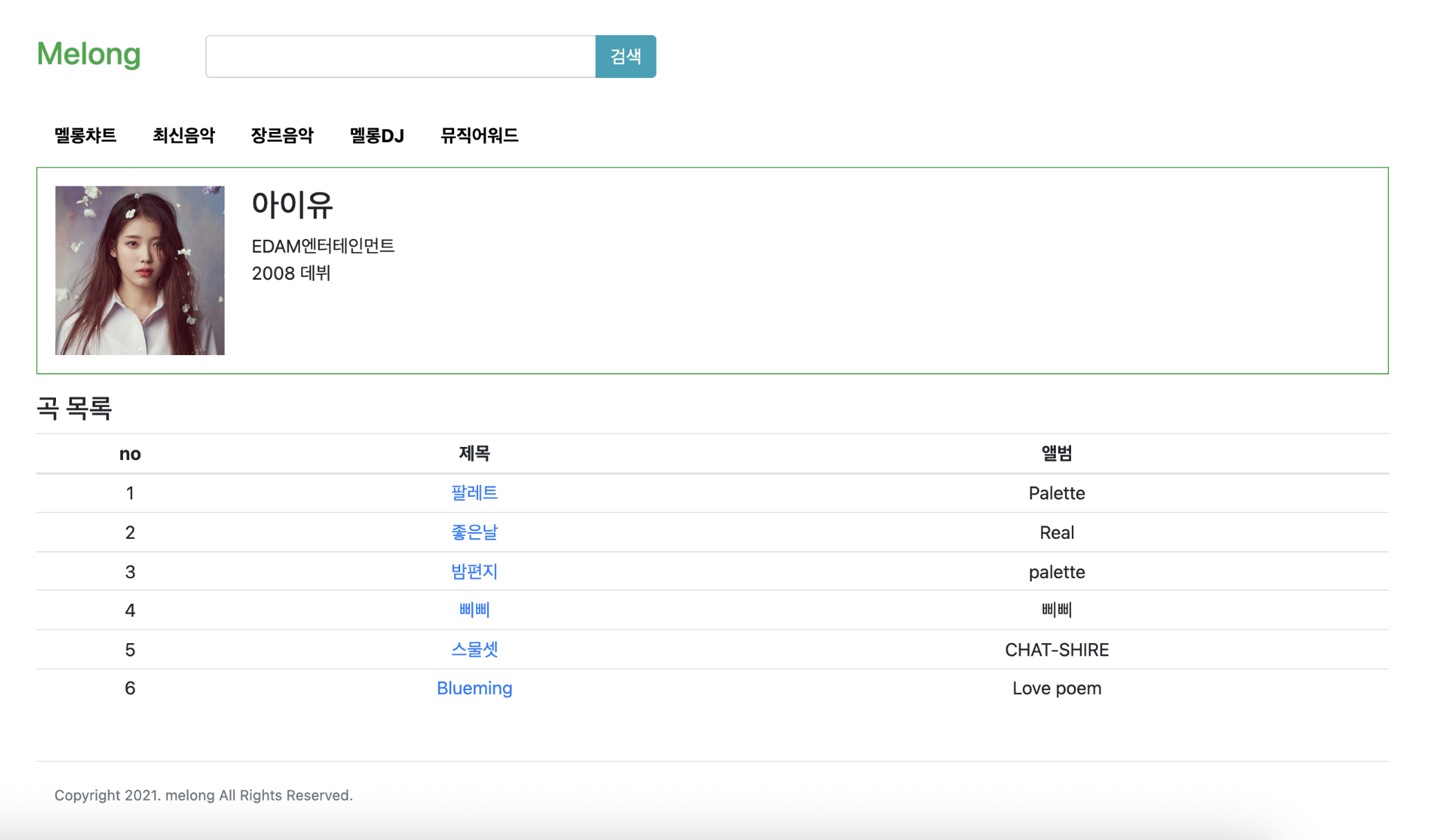
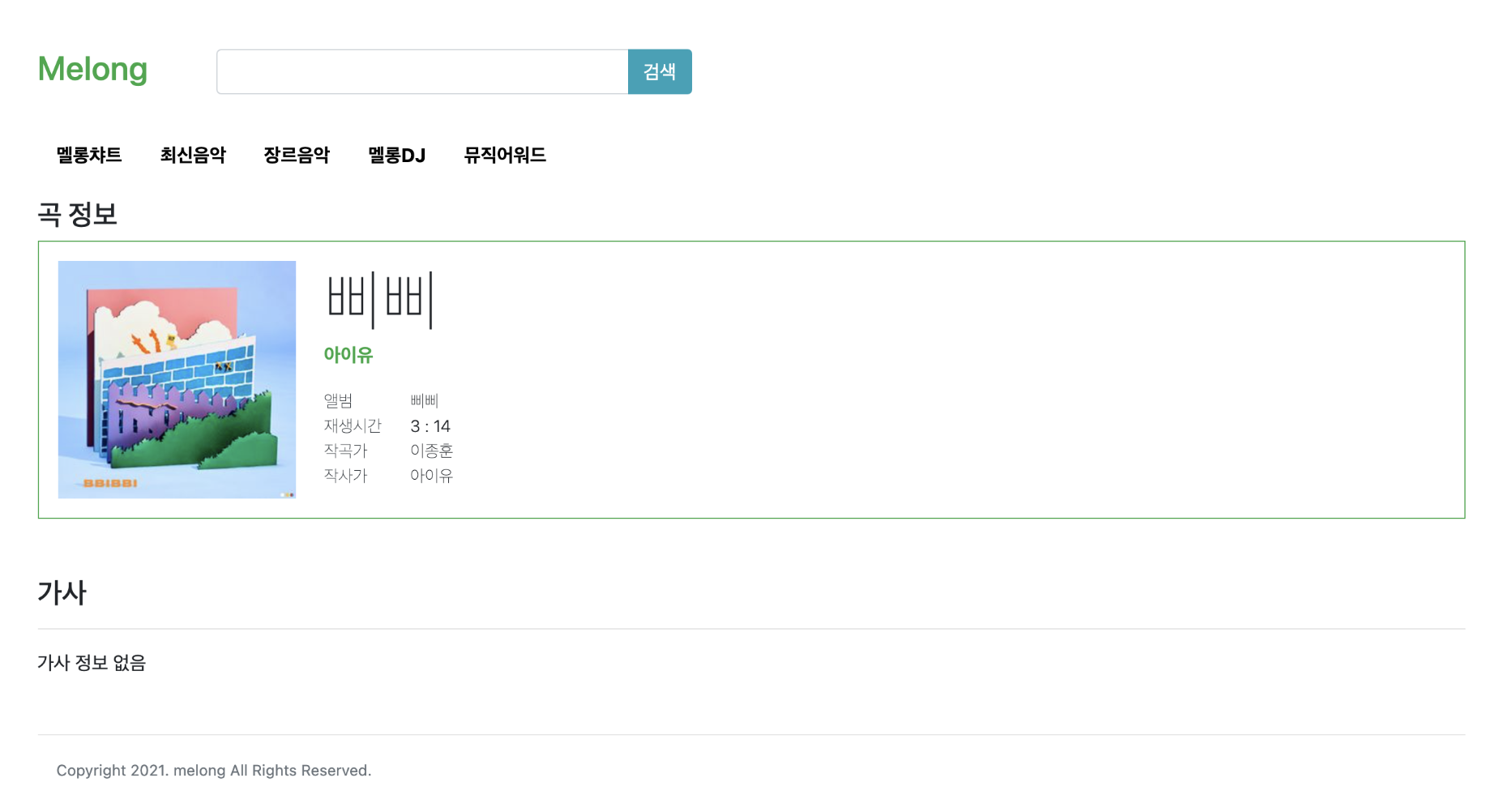
검색 or 클릭을 통해 result 페이지로 넘어갈 때, 하나는 값이 들어오지 않는데 이를 구분해 넘어가는 게 중요했다.
2. 정답 코드
수업에서의 정답 코드
1. Main page
<%@ page import="java.util.*" %>
<%@ page language="java" contentType="text/html; charset=UTF-8" pageEncoding="UTF-8" %>
<!DOCTYPE html>
<html>
<head>
  <meta charset="UTF-8">
  <title>멜롱-아이유</title>
  <link rel="stylesheet" href="https://cdn.jsdelivr.net/npm/bootstrap@4.6.2/dist/css/bootstrap.min.css" integrity="sha384-xOolHFLEh07PJGoPkLv1IbcEPTNtaed2xpHsD9ESMhqIYd0nLMwNLD69Npy4HI+N" crossorigin="anonymous">
  <script src="https://cdn.jsdelivr.net/npm/jquery@3.5.1/dist/jquery.slim.min.js" integrity="sha384-DfXdz2htPH0lsSSs5nCTpuj/zy4C+OGpamoFVy38MVBnE+IbbVYUew+OrCXaRkfj" crossorigin="anonymous"></script>
  <script src="https://cdn.jsdelivr.net/npm/bootstrap@4.6.2/dist/js/bootstrap.bundle.min.js" integrity="sha384-Fy6S3B9q64WdZWQUiU+q4/2Lc9npb8tCaSX9FK7E8HnRr0Jz8D6OP9dO5Vg3Q9ct" crossorigin="anonymous"></script>
  <style>
    a {
      text-decoration: none;
    }
    a:hover {
      text-decoration: none;
    }

    #wrap {
      width: 1200px;
      margin: auto;
    }

    header {
      height: 100px;
    }
    header .logo {
      width: 150px;
    }
    header .search {
      width: 1050px;
    }
    header .search .search-bar {
      width: 450px;
    }

    nav {
      height: 40px;
    }

    footer {
      height: 200px;
    }
  </style>
</head>
<body>
  <%
    Map<String, Object> artistInfo = new HashMap<>();
    artistInfo.put("name", "아이유");
    artistInfo.put("debute", 2008);
    artistInfo.put("agency", "EDAM엔터테인먼트");
    artistInfo.put("photo", "http://image.genie.co.kr/Y/IMAGE/IMG_ALBUM/081/867/444/81867444_1616662460652_1_600x600.JPG");

    List<Map<String, Object>> musicList = new ArrayList<>();

    Map<String, Object> musicInfo = new HashMap<>();
    musicInfo.put("id", 1);
    musicInfo.put("title", "팔레트");
    musicInfo.put("album", "Palette");
    musicInfo.put("singer", "아이유");
    musicInfo.put("thumbnail", "https://upload.wikimedia.org/wikipedia/ko/b/b6/IU_Palette_final.jpg");
    musicInfo.put("time", 217);
    musicInfo.put("composer", "아이유");
    musicInfo.put("lyricist", "아이유");
    musicList.add(musicInfo);
  %>

  <div id="wrap" class="container">
    <header class="d-flex align-items-center">
      <div class="col-2">
        <h3 class="text-success">Melong</h3>
      </div>
      <div class="col-10">
        <form method="get" action="/lesson02/quiz10_1.jsp">
          <div class="input-group">
            <input type="text" name="search" class="form-control col-6">
            <div class="input-group-append">
              <button class="btn btn-info" type="submit">검색</button>
            </div>
          </div>
        </form>
      </div>
    </header>

    <nav>
      <ul class="nav">
        <li class="nav-item"><a href="#" class="nav-link text-dark font-weight-bold">멜롱차트</a></li>
        <li class="nav-item"><a href="#" class="nav-link text-dark font-weight-bold">최신음악</a></li>
        <li class="nav-item"><a href="#" class="nav-link text-dark font-weight-bold">장르음악</a></li>
        <li class="nav-item"><a href="#" class="nav-link text-dark font-weight-bold">멜롱DJ</a></li>
        <li class="nav-item"><a href="#" class="nav-link text-dark font-weight-bold">뮤직어워드</a></li>
      </ul>
    </nav>

    <section class="contents">
      <div id="infoBox" class="container d-flex border border-success">
        <div>
          <img src="<%= artistInfo.get("photo") %>" alt="표지" width="150">
        </div>
        <div class="ml-3">
          <div class="font-weight-bold">
            <h3><%= artistInfo.get("name") %></h3>
          </div>
          <div><%= artistInfo.get("agency") %></div>
          <div><%= artistInfo.get("debute") %> 데뷔</div>
        </div>
      </div>

      <div>
        <h3 class="mt-3">곡 목록</h3>
        <table class="table text-center">
          <thead>
            <tr>
              <th>no</th>
              <th>title</th>
              <th>album</th>
            </tr>
          </thead>
          <tbody>
            <%
              for (Map<String, Object> song : musicList) {
            %>
              <tr>
                <td><%= song.get("id") %></td>
                <td><a href="/lesson02/quiz10_1.jsp?id=<%= song.get("id") %>"><%= song.get("title") %></a></td>
                <td><%= song.get("album") %></td>
              </tr>
            <%
              }
            %>
          </tbody>
        </table>
      </div>
    </section>

    <footer>
      <hr>
      <small class="text-secondary">Copyright 2025. melong All Rights Reserved.</small>
    </footer>
  </div>
</body>
</html>
2. Result page
<%@ page import="java.util.*" %>
<%@ page language="java" contentType="text/html; charset=UTF-8" pageEncoding="UTF-8" %>
<!DOCTYPE html>
<html>
<head>
  <meta charset="UTF-8">
  <title>멜롱-아이유</title>
  <!-- bootstrap CDN Link -->
  <link rel="stylesheet" href="https://cdn.jsdelivr.net/npm/bootstrap@4.6.2/dist/css/bootstrap.min.css" integrity="sha384-xOolHFLEh07PJGoPkLv1IbcEPTNtaed2xpHsD9ESMhqIYd0nLMwNLD69Npy4HI+N" crossorigin="anonymous">
  <script src="https://cdn.jsdelivr.net/npm/jquery@3.5.1/dist/jquery.slim.min.js" integrity="sha384-DfXdz2htPH0lsSSs5nCTpuj/zy4C+OGpamoFVy38MVBnE+IbbVYUew+OrCXaRkfj" crossorigin="anonymous"></script>
  <script src="https://cdn.jsdelivr.net/npm/bootstrap@4.6.2/dist/js/bootstrap.bundle.min.js" integrity="sha384-Fy6S3B9q64WdZWQUiU+q4/2Lc9npb8tCaSX9FK7E8HnRr0Jz8D6OP9dO5Vg3Q9ct" crossorigin="anonymous"></script>

  <style>
    a {
      text-decoration: none;
    }
    a:hover {
      text-decoration: none;
    }

    #wrap {
      width: 1200px;
      margin: auto;
    }

    header {
      height: 100px;
    }
    header .logo {
      width: 150px;
    }
    header .search {
      width: 1050px;
    }
    header .search .search-bar {
      width: 450px;
    }

    nav {
      height: 40px;
    }

    footer {
      height: 200px;
    }
  </style>
</head>
<body>
  <%
    // 아티스트 정보
    Map<String, Object> artistInfo = new HashMap<>();
    artistInfo.put("name", "아이유");
    artistInfo.put("debute", 2008);
    artistInfo.put("agency", "EDAM엔터테인먼트");
    artistInfo.put("photo", "https://pbs.twimg.com/profile_images/1374979417915547648/vKspl9Et_400x400.jpg");

    // 아이유 노래 리스트
    List<Map<String, Object>> musicList = new ArrayList<>();

    Map<String, Object> musicInfo = new HashMap<>();
    musicInfo.put("id", 1);
    musicInfo.put("title", "팔레트");
    musicInfo.put("album", "Palette");
    musicInfo.put("singer", "아이유");
    musicInfo.put("thumbnail", "https://upload.wikimedia.org/wikipedia/ko/b/b6/IU_Palette_final.jpg");
    musicInfo.put("time", 217);
    musicInfo.put("composer", "아이유");
    musicInfo.put("lyricist", "아이유");
    musicList.add(musicInfo);

    // 입력 생략
  %>

  <%
    // 상세 정보를 보여줄 target 세팅
    Map<String, Object> target = null;

    // 1. 목록에서 클릭한 경우 (id값)
    if (request.getParameter("id") != null) {
      Integer paramId = Integer.valueOf(request.getParameter("id"));
      for (Map<String, Object> music : musicList) {
        Integer id = (Integer) music.get("id");
        if (id.equals(paramId)) {
          target = music;
          break;
        }
      }
    }

    // 2. 상단에서 검색한 경우 (search값)
    if (request.getParameter("search") != null) {
      String paramSearch = request.getParameter("search");
      for (Map<String, Object> music : musicList) {
        String title = (String) music.get("title");
        if (title.equals(paramSearch)) {
          target = music;
          break;
        }
      }
    }
  %>

  <div id="wrap" class="container">
    <header class="d-flex align-items-center">
      <div class="col-2">
        <h3 class="text-success">Melong</h3>
      </div>
      <div class="col-10">
        <form method="get" action="/lesson02/quiz10_1.jsp">
          <div class="input-group">
            <input type="text" name="search" class="form-control col-6">
            <div class="input-group-append">
              <button class="btn btn-info" type="submit">검색</button>
            </div>
          </div>
        </form>
      </div>
    </header>

    <nav>
      <ul class="nav">
        <li class="nav-item"><a href="#" class="nav-link text-dark font-weight-bold">멜롱차트</a></li>
        <li class="nav-item"><a href="#" class="nav-link text-dark font-weight-bold">최신음악</a></li>
        <li class="nav-item"><a href="#" class="nav-link text-dark font-weight-bold">장르음악</a></li>
        <li class="nav-item"><a href="#" class="nav-link text-dark font-weight-bold">멜롱DJ</a></li>
        <li class="nav-item"><a href="#" class="nav-link text-dark font-weight-bold">뮤직어워드</a></li>
      </ul>
    </nav>

    <section class="contents">
      <%
        if (target != null) { // -- if문 시작
      %>

      <h4 class="mt-4">곡 정보</h4>
      <div class="d-flex border border-success p-3">
        <div class="music-info">
          <img class="album-size" src="<%= target.get("thumbnail") %>">
        </div>
        <div class="ml-4">
          <div class="display-4"><%= target.get("title") %></div>
          <div class="font-weight-bold text-success"><%= target.get("singer") %></div>
          <div class="d-flex mt-3 music-info">
            <div class="text-dark">
              <div>앨범</div>
              <div>재생시간</div>
              <div>작곡가</div>
              <div>작사가</div>
            </div>
            <div class="ml-4">
              <div><%= target.get("album") %></div>
              <div><%= (Integer) target.get("time") / 60 %>:<%= (Integer) target.get("time") % 60 %></div>
              <div><%= target.get("composer") %></div>
              <div><%= target.get("lyricist") %></div>
            </div>
          </div>
        </div>
      </div>

      <h4 class="mt-4">가사</h4>
      <hr>
      <div>가사 정보 없음</div>

    </section>

    <%
      } else { // -- if문 종료, else문 시작 => target이 없는 경우
    %>
    <section>
      <h1>정보 없음</h1>
    </section>
    <%
      }
    %>

    <hr>
    <footer>
      <small class="text-secondary">Copyright 2024. melong All Rights Reserved.</small>
    </footer>
  </div>
</body>
</html>
3. 내가 푼 방법
1. Result page
공개된 정답 코드와 다른 부분만 보자면
<%
  String search = request.getParameter("search");
  Integer id = null;
  if (request.getParameter("id") != null) {
    id = Integer.parseInt(request.getParameter("id"));
  }

  for (Map<String, Object> albumInfo : musicList) {
    boolean match = false;

    if (id != null) {
      match = id == albumInfo.get("id");
    } else if (search != null) {
      match = search.equals(albumInfo.get("title"));
    }

    if (match) {
%>
  <div>
    <img src="<%= albumInfo.get("thumbnail") %>" alt="표지" width="150">
  </div>
  <div class="ml-3">
    <div class="display-4"><%= albumInfo.get("title") %></div>
    <div class="text-success"><%= albumInfo.get("singer") %></div>
    <div>앨범 <%= albumInfo.get("album") %></div>
    <div>재생시간 <%= (int) albumInfo.get("time") / 60 %>:<%= (int) albumInfo.get("time") % 60 %></div>
    <div>작곡가 <%= albumInfo.get("composer") %></div>
    <div>작사가 <%= albumInfo.get("lyricist") %></div>
  </div>
<%
    }
  }
%>
반복문을 한번만 돌리면서 검색, 클릭 둘 중 하나에서 요청된 값과 일치하는 조건으로 결과를 띄우고 싶었다.
// 정말 단순하게 아래처럼 생각할 수도 있겠지만

if (id == albumInfo.get("id") || search.equals(albumInfo.get("title")))

/*
이경우에 한쪽에 null이 들어오게 되어 NPE를 띄운다.
즉, 값이 null인지 아닌지 확인하는 조건이 선행되어야 한다는 것.
*/

if (id == null || search == null) {
  continue;
}

/*
아님 null일 경우 빠져나오게 해야하나? 싶지만, 원하는 건 일치하는 값을 띄우는 것이기에 불가하다.
이럴 때 유용하게 쓸 수 있는 게 flag변수이다.
*/

for (Map<String, Object> albumInfo : musicList) {
    boolean match = false;

    if (id != null) {
      match = id == albumInfo.get("id");
    } else if (search != null) {
      match = search.equals(albumInfo.get("title"));
    }
}

// if를 충족할 경우 true로 들어옴 -> boolean으로 저장 true일 경우 원하는 데이터 출력.

Integer id = null;
  if (request.getParameter("id") != null) {
    id = Integer.parseInt(request.getParameter("id"));
  }

/*
또한 object에 저장된 id 값도 위처럼 처리해 주지 않으면 null로 들어올 경우 타입 변환이 불가하므로 NPE가 뜨게된다.
그리고 null과 비교할 수 있도록 int가 아닌 Ineger로 저장해줘야 한다.
*/
Leave a comment